
Best Cheap / Budget Wireless Routers 2018
A time will surely come when you will need to upgrade your home network whether you want to or not. New wireless technologies, along with the new breed of consumer gadget that they are bound to create, will soon make your existing network obsolete and unable to cope up with their increasing WiFi requirements of these modern-day tools.
Thus, you’ll soon find yourself shopping for a suitable wireless router. But, this task becomes more difficult if you have a very strict budget to work with.
Table of Contents
- 1 Best Cheap / Budget Wireless Routers : Top Picks
- 1.1 D-Link Wireless N 300 Mbps Router (DIR-605L)
- 1.2 TRENDnet Wireless N300 Home Router
- 1.3 Linksys EA4500 App-Enabled N900 Dual-Band Wireless-N Router
- 1.4 Netis WF2533 Wireless N300 High Power 500mW Router
- 1.5 TOTOLINK AC1200 Dual Band Wireless WiFi Router
- 1.6 TP-Link N300 Wireless Wi-Fi Router
- 1.7 Tenda N301 N300 Wireless Wi-Fi Router
- 1.8 Belkin F9K1123-RM AC1200 Dual Band AC Wireless Router
This is where this list of the best cheap / budget routers 2018 comes in. We’ve curated the most promising products currently available on the market to come up with this hand picked list. All of these routers are priced below $50 and half of them are even priced below $20.
It’s true that you’ll also likely find a good wireless router if shock around yourself but you likely don’t have the time to do such time-consuming task. Use this list instead and you’re guaranteed to come up with a cool new high-performing router even on a budget.
Best Cheap / Budget Wireless Routers : Top Picks
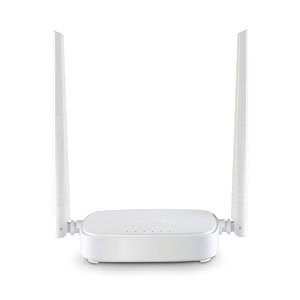
Tenda N301
Best In Price Pick
Lowest priced router that’s big on performance
Rated by: OnRampWireless
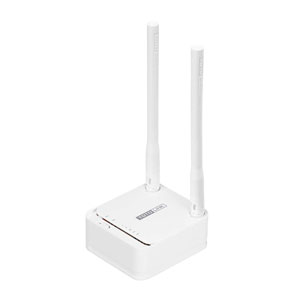
TOTOLINK AC1200
Top Overall Pick
A budget router that has all the perks you need
Rated by: OnRampWireless
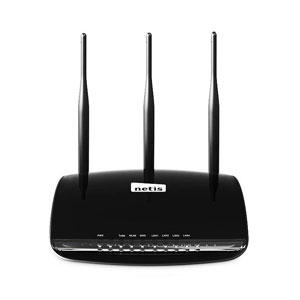
Netis WF2533
Best In WiFi Range
Budget router that matches WifI range of higher-end models
Rated by: OnRampWireless
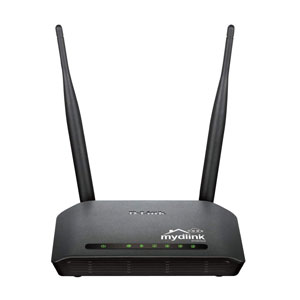
D-Link Wireless N 300 Mbps Router (DIR-605L)
Quick Summary
Our Rating
Just because you are on a budget, it does not mean that you will not be getting a router that will give you a reliable and fast wireless speed for your home network.
One of the best cheap / budget wireless routers is the DIR-605L Wireless N 300 router by well-known manufacturer D-Link.
The D-Link router can deliver fast wireless speeds of up to 300 Mbps, a bandwidth that is sufficient for everyday web activities. For comparison, such speed is way better than Wireless G models as the DIR-605L can deliver network speeds 14 times faster than those older routers.
Network maintenance activities are also very easy with the D-Link Wireless N 300 router. Its configuration and settings are accessed via a cloud-based app, allowing you to view real-time browsing history, connect or disconnect wireless devices from the network remotely, or implement time scheduling of internet availability – a useful way to make sure your children’s internet use stays within allowed time limits.
The D-Link router also comes with security features to help combat against threats from the internet. There is an SPI firewall as well as WPA2 to bar intrusions to your network.
For wired connections, there are four LAN Ethernet ports. This ensures that even your wired devices will get the same seamless internet access.
PROS
CONS
TRENDnet Wireless N300 Home Router
Quick Summary
Our Rating
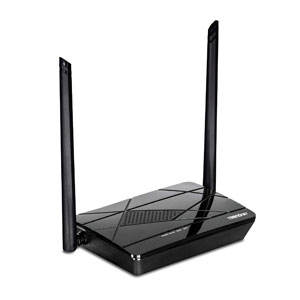
The TRENDnet TEW-731BR is another fine product that, surprisingly, delivers a solid performance considering its very affordable price.
Since it is doing such a fine job, we’ve included this product as one of the best cheap / budget wireless routers currently available on the market.
We know that as far as speed is concerned, this router can’t really match up against high-end AC routers. However, the TEW-731BR still delivers an amazing 300 Mbps, which is still a pretty fast wireless speed and definitely sufficient for online activities such as streaming, especially if your network does not have a lot of users, to begin with.
The TRENDnet Wireless N300 router is very easy to set up making it ideal for those users who don’t want to fuss over tech stuff. Joining the network is very easy as well with its One Touch Connection feature which connects gadgets securely with a touch of the WPS button.
The network is pre-encrypted for security. There are parental controls to better manage the network, and GREENnet technology to reduce power consumption by up to 50 percent. This router has IPv6 network support as well.
Wired gadgets can connect via the router’s 4 fast Ethernet LAN ports. WiFi coverage for wireless gadgets, on the other hand, is sufficient for an entire average-sized home.
PROS
CONS
Linksys EA4500 App-Enabled N900 Dual-Band Wireless-N Router
Quick Summary
Our Rating
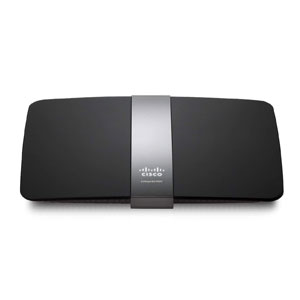
There’s a reason why the Linksys EA4500 N900 Dual-band router is considered to be of the best cheap / budget wireless router currently available on the market. It is super-fast with network speeds already approaching the gigabytes per second territory.
It has, in fact, three times the network speeds of the two previous products introduced in this list. And the best part is, you only need to fork over a little more cash to get this boost in WiFi speed.
The Linksys boasts of a spectacular data transfer rate of up to 900 Mbps which is just 100 mbps shy from the 1 Gbps mark. It is the best-in-class Wireless N speed and is fast enough to deliver lag-free gaming, video streaming, and other net activities.
Compatibility is not a problem with the Linksys EA4500 App-Enabled N900 Dual-Band Wireless-N Router with Gigabit and USB (Certified Refurbished). It supports 802.11a/b/g/n wireless protocols which means it basically works with any WiFi certified device.
For network security, it has VPN support and a firewall. Its WiFi range is good, thanks to its 6 internal antennas giving it the capability to deliver a strong and stable wireless signal while reducing dead spots.
There are 4 Gigabit LAN Ethernet ports for wired devices. There is also a USB port which can be used as storage or printer connection. The router is certified refurbished by the manufacturer and carries a 90-day warranty.
PROS
CONS
Netis WF2533 Wireless N300 High Power 500mW Router
Quick Summary
Our Rating
The Netis WF2533 is one hardworking router. Aside from being a router, it can also function as an Access Point or a Repeater.
And, with its Turbo button that instantly boosts signal strength as if by magic, this has to be one of the best cheap / budget wireless routers currently being sold on the market.
The Netis router might seem to be just your regular N300 router until you experience its magic first-hand. Yes, that magical Turbo button had fans raving about it on Amazon’s comments section. With one push, you’ll activate its turbo mode which increases signal strength and, consequently, enhances WiFi range to a distance you never thought possible for a budget router.
Not that its non-turbo mode is bad. In fact, you can already get a pretty good signal range in regular mode thanks to its 3 external high gain 5dBi detachable antennas – it can even cover up to 5,000 square feet of space or the size of a large home. This detachable description needs to be stressed since it will allow you to swap antennas if you want it upgraded.
Wireless speeds can reach up to 300 Mbps. Yes, it’s not too shockingly fast but it should keep you satisfied with video streaming, gaming and the like. Such bandwidth is actually good for homes with lesser occupants and wireless gadgets.
The router supports multi-SSIDs that you can assign to family members. If you want, you can set up 3 separate networks for visiting friends for added layers of security.
There are 4 LAN Ethernet ports for wired devices. Unfortunately, there is no USB port for printers or network storage.
PROS
CONS
TOTOLINK AC1200 Dual Band Wireless WiFi Router
Quick Summary
Our Rating
Bet you never thought you’ll find a dual-band router that’s affordably priced. The TOTOLINK A3 AC1200 delivers the fast wireless speeds this class of routers is known for but at a fraction of the cost of other brands.
For that reason, it is one of the best cheap / budget wireless routers you will ever get your hands on.
This is an 802.11ac router after all which means that its biggest advantage over less technologically advanced competitors is its wireless speed. With dual-band feature, it can reach astonishing combined data speeds of up to 1167 Mbps, a combination of the 300 Mbps from the 2.4 GHz band and another 867 Mbps from the 5GHz band.
Such speed leaves competitors in the dust and would ensure that devices connected to your network will enjoy lag-free gaming, 4K video streaming, and other bandwidth-heavy activities. Given its price, it truly is the way to go when it comes to upgrading your network without straining your budget.
The router also gives the user a lot of customization options for the network. Its QoS allows you to tinker with bandwidth control as you may allocate bandwidth limits to each device connected to the network. Customization options also allow you to add additional wireless networks for access control and you can limit your children’s exposure to the web via parental controls
The router’s design is minimalist - a small white box with two external antennas that looks clean and won’t offend any design elements no matter where it might be placed in your home. It certainly jives well with any Apple product as they seem to share the same aesthetic approach.
There is a WAN and 2 LAN Ethernet ports.
PROS
CONS
TP-Link N300 Wireless Wi-Fi Router
Quick Summary
Our Rating
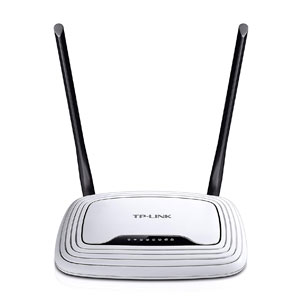
TP-Link is a well-known name in the computer accessories industry. As such, you can expect that its products would do as advertised. Of course, you can’t expect the TL-WR841N N300 router to perform on par with a dual-band Gigabit router.
But as an entry-level wireless N router, it does its job perfectly earning it a spot in this list of best cheap / budget wireless routers for 2018.
For its price, the TP-Link N300 router offers a reliable, stable performance perfect for your home network. Its speed, which tops at 300 Mbps, is fast enough for regular video streaming, online gaming, and other online activities.
Its signal stability and range are greatly enhanced by its two high-quality 5dBi antennas. There is an IP-based QoS for setting up limits, bandwidth management, and other network configurations. Children can be protected and internet usage monitored via parental controls.
Backwardly compatible with older WiFi devices, you’ll be able to use your time-tested but well-loved favorite gadgets. There are 4 LAN Ethernet ports to connect wired devices.
PROS
CONS
Tenda N301 N300 Wireless Wi-Fi Router
Quick Summary
Our Rating
Not everyone has the same requirements for their home network. The more tech-savvy ones would invariably want the latest networking technologies available even in their homes.
But a majority of users just want a connection that’s fast enough for their needs minus the frills – a type of router that you can just plug and forget because it reliably does its job even if you’re not minding too much about it.
If you belong to the second group of uses, then the Tenda N381 N300 router is perfect for you. And because of its incredibly low price, we’ve also included it in best cheap / budget wireless routers for 2018 list.
It’s a Wireless N router with speed up to 300Mbps making it ideal for streaming, online gaming, VoIP, and regular web browsing. The router’s range and signal stability are enhanced by two 5dBi antennas. You can also implement parental controls and some bandwidth management.
Not everyone is talented with tech matters and, thankfully, the Tenda N301 does not require any talent at all when installing the router aside from the basics like knowing where to plug which wire. Installation is super easy and fast.
There are three LAN and WAN ports available. However, the router lacks a USB port.
PROS
CONS
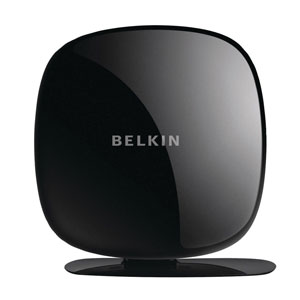
Belkin F9K1123-RM AC1200 Dual Band AC Wireless Router
Quick Summary
Our Rating
The fact that Belkin F9K1123-RM AC1200 is a dual-band router should pique any buyer’s interest.
And when you factor in its very affordable price tag, you’ll surely start thinking that it is one of the best cheap / budget wireless routers on the market, just like we did.
Of course, part of the explanation why it is incredibly priced is that its certified refurbished. But that does not take away the fact that it is an AC1200 router. WiFi combined speeds can reach up to 1167 Mbps, a combination of 867 Mbps from the 8 GHz band and 300 Mbps from the 2.4 GHz.
There are 4 LAN Ethernet ports for gadgets that require to be wired. In addition, there is a USB port for printer, file sharing or additional storage.
You can filter content via its Norton-powered filtering feature. There are there types of content that you can block but customizing it is not possible. QoS is present where you can prioritize voice chat, video streaming, and online gaming.
PROS
CONS
As you can see from this list, there are wireless routers that deliver a solid performance without breaking the bank. Ultimately, however, it will depend on you as a buyer to choose which router really fits your needs. Meanwhile, you can use this list as a guide in your shopping adventure.